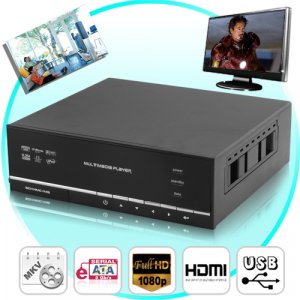
CVPN-HD04
his is the ultimate home entertainment system. It is the think tank of all media tanks. Powered by a Realtek 1073 chip and housed in an aluminum casing. This HDD multimedia player handles up to a 2TB HDD hard disk drive and supports several display resolutions that include 720P, 1080i, 1080p at (1920X1080).
Although this 1080p Media Carrier is designed to allow users to implement a much more efficient media system in their homes, it is also designed to meet the user's expectations in providing a simpler and convenient method of accessing the internet directly without the need of a computer.
This Media Centre enables the user to access websites such as Youtube, Flickr, RSS news feeds, Picassa directly on their LCD TV with ease, speed and efficiency, thanks to the onboard Ethernet port which allows user to connect this Media Centre directly on to the internet.
What is Bit Torrent? BitTorrent protocol allows users to distribute large amounts of data without the heavy demands on their computers that would be needed for standard Internet hosting. A standard host's servers can easily be brought to a halt if high levels of simultaneous data flow are reached. To learn more about BitTorrent visit [http://en.wikipedia.org/wiki/BitTorrent_%28protocol%29].
This HD 1080p HDD media centre offers a versatile infrastructure that enables the user to merge all of their precious digital contents such as music files, video files and image files onto a single location for a more enjoyable experience, and also helps users keep their files organized in this mother of all media tanks.
This media home entertainment center comes with a composite video port, component YPbPr port, HDMI port, optical fibre audio port, coaxial, 5.1 channel audio port, Stereo L-R, Multi-interface output, supports projectors and TV (AV) composite video. This media centre supports up to 15 of the most popular video and audio file formats which include MPEG, RMVB, AWV, MP4, MOV, MKV, FL, DIVX, AAC, MP3, WAV, WMA, FLAC, OGG and ASF.
This Full HD 1080p media entertainment centre comes integrated with a web server called Neighbor Web, after you've connected your the Media Carrier onto you network (LAN or WLAN), get the IP address of the player under SETUP > NETWORK menu. Then type the IP address (e.g., 192.168.3.15) in the address bar of the Internet Explore on your PC, after this step is completed, just log in using the included user name and password that is provided in the included user manual, and access the Web server on your PC.
At a Glance...
Easy installation
Bit Torrent Ready
HD 1080p quality
Multimedia center
HDD media center
Direct internet access
File Copying function
Supports up to 2TB (HDD) hard disk drive
Supports Manual fixed IP and Auto IP configurations
Attach multiple media devices, such as UB drives, HDD and an SD card
Manufacturers Specification
Main Function: Full HD 1080p Media Centre - Bit Torrent Ready + HDD Enclosure
Color: Black
Material: Aluminum Alloy Housing
Main Chip: Realtek 1073
HHD Supported Capacity: 500GB, 1TB, 1.5TB, 2TB
On Board Features/Ports:
- 3.5’ Inch SATA HDD Insert
- Internet LAN RJ45 port
- USB 2.0 HOST port x 2 (compatible to USB 1.1)
- Memory Card slot (supports SD/MMC/MS Pro)
- USB 2.0 DEVICE port (connecting to PC)
- Composite (CVBS) A/V jack
- Component Y/Pb/Pr jack
- HDMI V1.3 interface
- S/PDIF coaxial & optical jack
Support NAS Function: Secure Windows file sharing (Samba) over the Internet
Support Wireless LAN: (802.11N)
Power Source: DC-IN 12V
File Systems Supported: EXT3 / FAT32 / NTFS
Data Interface: Support USB 2.0 & USB 1.1/1.0
Power Adapter: 110-240V input, 12V/2A output
Memory Card Reader Function: SD Card, MMC and MS
Media formats Supported:
Supported Media Files:
- Video: MPEG, RMVB, AWV, MP4, MOV, MKV, FLV, DIVX, DAT
- Audio: AAC, MP3, WAV, WMA, FLAC, OGG, ASF
- Photo formats : JPEG, BMP, PNG, GIF
Resolution: Up to 720p / 1080i / 1080p
Video Codec’s Supported:
- MPEG-1
- HD MPEG-2
- HD MPEG-4 SP/ASP/AVC (H.264)
- WMV9 (VC-1)
- Real Networks (RM/RMVB) 8/9/10, up to 720p
Audio Codec’s Supported:
- MP2/3, OGG Vorbis, WMA , PCM, LPCM, MS-ADPCM, LC-AAC, HE-AAC, RA-Lossless
Subtitle Formats Supported: SRT
Network Feature
- 10/100Mbps Auto-Negotiation Ethernet
- Supports 802.11b/g/n WLAN, up to 300Mbps (USB Dongle Not Included)
Main Menu Icons: File Copy, Browse, Network, IMS Menu, Setup
Secondary Access Functions:
- File Copy
- Browse - HDD, USB, SD Card, DVD, Network UPNP, Play list
Network
- IMS Menu - Internet Channels, Search Video, Media Library, Picasa, Flickr, RSS News
Setup:
Audio
- Night Mode - OFF, ON
- Digital Output - HDMI LPCM, HDMI, LPCM Multich, HDMI Raw, SPDIF LPCM, SPDIF Raw
Video
- Aspect Ratio - Letter Box 4:3, Pan Scan 4:3, 16:9, 16:10
- Zoom - ON, OFF
- Brightness
- Contrast
- Hue
- Saturation
- Digital Noise Reduction - Auto, Off
- Video System: HDMI Auto, NTSC, PAL, 480p, 576p, 720p 50HZ, 720 60Hz, 1080i 50Hz, 1080i 60Hz, 1080p 50Hz, 1080p 60Hz
- SD Video System - NTSC, PAL
- 1080p 24HZ- ON, OFF
Network
- Wired LAN - DHCP IP Auto, FIX IP (Manual)
- Wireless Setup - Infrastructure (AP), Peer to Peer(Ad Hoc), WPS(AP)
System:
- Menu Languages - English, Simplified Chinese, Spanish, French, Deutsch, Italian, Dutch, Russian, Traditional Chinese
- Text Encoding - Unicode (UTFB), (GBK), (BIG5), Western, Turkish, Central European, Greek, Cyrillic, SE European
- LOG IN Control - ON, OFF
- R/RW Auto Play
- Angle Mark
- HDD Format
- Restore Default
MISC
- Resume Play - ON, OFF
- Slide Show Timing
- Transition Effect
- Ken Burns
- Seamless Playback
- Screen Saver
- Movie Preview
Dimensions: 190 x 170 x 65 (mm)
Certification: CE, FCC
Manufacturers Ref: KLF753JDF08G
Product Notes
Displays RM/RMVB at 720P
Complete multimedia system
All-in-one multimedia solutions
Organizes your entire digital media contents
Solid built with SD card, x2 USB, HDMI and Ethernet ports
Access you tube flawlessly without the need of a computer
Simple slide in and out HDD hard disk drive for extra convenience
Detailed Instructions user manual provided for troubleshooting and easy installation
Supports Decoding of VC-1, MPEG1, MPEG2, MPEG4, Divx, Xvid, FLV, RM/RMVB Video Codecs
Brilliant HD output quality, & exceptionally smooth performance in ever aspect of its features and functions.
This HDD multimedia HD entertainment system is a very advanced home entertainment media center, it will add extreme value to your media centre in your home
Package Contents for Model - CVPN-HD04
Full HD 1080p Media Centre - Bit Torrent Ready + HDD Enclosure
A/V cable
USB cable
Remote Control
Remote Control Battery
AC/DC adaptor
AC/DC adaptor Power Cord
User Manual (printed)
Driver CD (with User Manual)
FAQ - Frequently Asked Questions
I used my player to transfer files back and forth between different computers. Will defragmenting the player hard disk do any harm to it?
Defragmenting the player hard disk may be useful after having transferred many files to and from the player, it is never harmful. Make sure no other programs are running while using the Windows defragment utility.
When I switch to Y/Pb/Pr 480p, 576p, 720p, 1080i, and 1080p, does the TV screen display an unwatchable picture?
Please check if your TV supports Y/Pb/Pr 480p, 576p, 720p, 1080i, and 1080p output, if your TV does not support, please use the A/V signal display instead, press the TV SYSYEM button on the remote control, then switch the TV’s video input to NTSC or PAL.
I cannot see files shared on my computer via Browser->Network menu.
Please check following items:
- Connect the player to network and obtain an IP address first;
- Please enable NetBIOS of TCP/IP on computer;
- Please check your PC’s firewall settings;
- Please enable your PC’s ‘Guest’ account;
- Please share the folders which you wish to browse on your PC, and make sure that ‘Everyone’ or ‘Guest’ has the right to access.
I configured everything correctly, but still cannot get the wireless network or UPnP function to work.
Are you using a firewall such as Norton Internet Security, McAfee Personal Firewall, Zone Alarm, etc. or even the built-in firewall of Windows XP? (Don’t forget that Service Pack 2 for Windows XP automatically upgrades your firewall and turn it on by default)
If you have a firewall, it may need to be configured or have exceptions created to allow you to see and communicate with the player on the network. To test if your firewall is preventing network communication (including PING and access shared folders), try disabling it to see if you can connect. If you can connect with the firewall disabled, you may need to add the player to the ‘Trusted’ list or configure the firewall for local intranet access.